



Choose 3D printer parts with less guesswork
When a printer starts clicking, dragging, wobbling, or laying down rough lines, the problem is often not the whole machine. It is usually one small part that no longer fits the job well. This category helps you compare 3D printer replacement parts AliExpress shoppers often need, so you can focus on fit, function, and print goals instead of relying on appearance alone.
On the Singapore site, you can sort through nozzles, hotend pieces, extruder parts, belts, rollers, fans, sensors, bed parts, and control components in one place. That matters, as a part that looks right in a photo can still fail on voltage, connector shape, thread size, or mounting points. And one small mismatch can turn a smooth print into a noisy, frustrating pause.
So what should you check first before choosing a replacement or upgrade?
Start with the part of the printer that affects the symptom
If prints show under extrusion, blobs, stringing, or skipped layers, begin with the extrusion path. If the carriage shakes, binds, or leaves ripples, look at motion parts. If temperatures jump or drift, focus on heating and sensing parts. This approach saves time, as it helps you solve the true fault instead of swapping random pieces.
Nozzles, hotend, and extruder parts
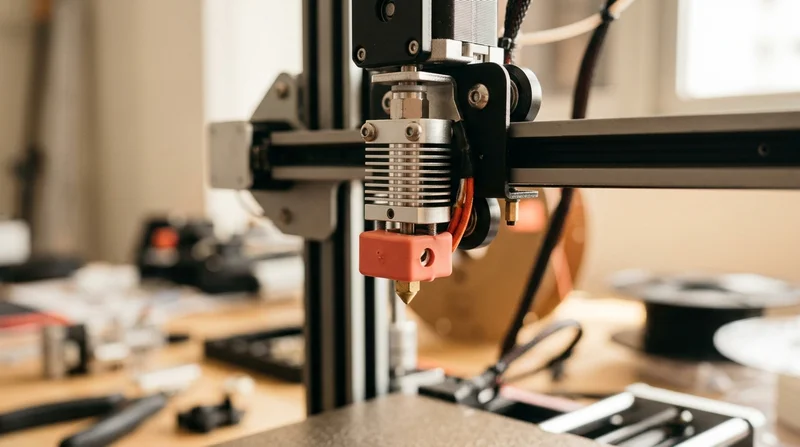
Nozzles hotend and extruder parts for 3D printers shape how filament flows, melts, and lands on the bed. A worn nozzle can soften detail. A weak extruder gear can slip with a faint grinding sound. A tired hotend setup can struggle to hold steady heat during long jobs.
- Choose brass nozzles for common daily printing, as they heat quickly and support smooth flow.
- Choose harder nozzle materials for abrasive filaments, as wear resistance helps keep line width more consistent.
- Compare hotend parts by thread type, heater cartridge size, thermistor style, and mounting pattern, as these details affect real compatibility.
- Check extruder gears, arms, and feeder assemblies if filament clicks or shaves, as the issue may be grip rather than heat.
If you also work on wiring, connectors, or tool side repairs, explore Hand Tools, Screwdriver Sets, and Soldering Kits for bench support.
Belts, rollers, and motion parts
3D printer belts rollers and motion parts control how the machine glides and tracks. When motion feels rough in the hand or sounds sharp and uneven, print quality often follows. Loose belts can blur corners. Worn wheels can add vibration. Bent or tired motion pieces can leave repeating marks you can both see and feel.
- Check belt width, tooth profile, and length, as even small differences affect tension and tracking.
- Compare rollers and wheels by size, bearing feel, and material, as smoother travel often means cleaner walls.
- Replace one motion variable at a time, as this keeps troubleshooting clearer after each change.
Cooling, heat, and sensing parts decide print stability
Many hobby printers fail quietly before they fail visibly. A fan may still spin, yet not move enough air. A thermistor may still read, yet drift under load. That is why 3D printer cooling fans and thermistor replacements matter so much for stable, repeatable results.
On the Chinese marketplace, compare fans by size, voltage, connector, airflow direction, and noise profile. Compare thermistors and heater parts by resistance type, cartridge dimensions, cable length, and plug style. These details protect you from the common trap of choosing by photo alone.
- Choose the correct fan voltage, as the wrong rating can lead to weak cooling or part failure.
- Check connector type before anything else, as a perfect fan body still becomes useless with the wrong plug.
- Replace unstable thermistors when temperatures swing oddly, as false readings can mimic other faults.
- Look at heater cartridges if warm up feels slow, as the issue may be heat delivery rather than firmware.
Need checking tools for electrical diagnosis? See Multimeters and Electric Screwdrivers. One quick test can prevent a much longer repair. But what about the print surface itself?
Bed parts and build surfaces shape the first layer
Build plate and bed parts for 3D printers affect the moment every print begins. If the first layer looks patchy, lifts at the corners, or feels uneven under the nozzle, the bed system deserves attention. A flatter, more stable surface often brings instant visual relief, as the first layer goes down with a cleaner, calmer look.
- Compare build surfaces by texture and material, as adhesion feel changes with filament type and print style.
- Check bed size and hole spacing carefully, as near matches often create mounting trouble.
- Look at springs, spacers, clips, and leveling hardware, as small support parts can improve consistency.
If your workspace also needs alignment help during setup, Laser Levels can support cleaner bench organization and mounting checks.
Boards and drivers matter when the printer acts strangely
Control board and stepper driver parts for 3D printers are worth checking when motors skip, directions reverse, noise rises, or heating behavior turns unpredictable. These parts feel more advanced, yet they still follow practical rules. Match the board to your printer model, motor setup, firmware needs, and connector layout, as one wrong port arrangement can stop a repair before it starts.
On AliExpress, many shoppers compare boards and drivers for quieter movement, added features, or replacement after failure. Move carefully here. Upgrade only what you understand, as changing several electronic parts together can blur the source of any new problem.
For nearby workshop categories, you can also browse Power Tool Accessories and Electronics if your maker space covers more than printing alone.
Costly mistakes to avoid when choosing 3D printer parts
Some mistakes cost more than the part itself. They cost time, failed prints, wasted filament, and confidence. Avoid these common traps when comparing parts on the platform.
- Do not choose by appearance alone, as printer model, voltage, thread size, and mounting points matter more than a similar photo.
- Do not replace the visible symptom only, as a clogged hotend, weak fan, worn gear, or drifting thermistor can imitate nozzle problems.
- Do not choose the cheapest material for high heat or high wear zones, as short life can turn one repair into repeated downtime.
- Do not upgrade many parts at once, as you lose a clear baseline and make diagnosis harder if print quality changes.
The better path is simple. Change one meaningful variable. Print a known test. Listen to the machine. Watch the layer lines. Feel the motion. That calm method usually leads to faster answers and better results.
How to choose with more confidence
The goal is not just to replace a part. The goal is to make the printer feel dependable again. When the right nozzle flows smoothly, the right fan cools cleanly, and the right motion parts glide without chatter, the whole machine feels easier to trust. Long prints become less stressful. Finished parts look sharper. Maintenance starts to feel like control rather than chaos.
- Match every part to printer model first, as compatibility is the foundation of every good repair.
- Match material to filament and heat demands next, as print conditions shape wear and consistency.
- Match the upgrade to one clear goal, as better detail, quieter motion, or steadier temperatures each need different parts.
- Read dimensions and connector details closely, as small numbers decide real world fit.
If you want a smart place to begin, start with the component closest to the symptom you can clearly see, hear, or feel. That one decision often changes everything.