


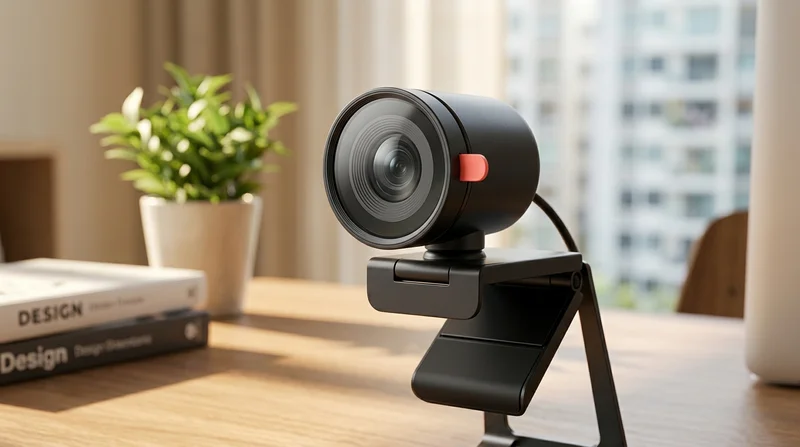

Choose a webcam by how you actually use it
A webcam is not just a spec sheet on a product page. It is the first thing people see when you join a meeting, teach a lesson, or go live. The right model helps your face look clear, your motion feel smooth, and your voice come through with less effort, as every part of the setup works together.
This category focuses on personal video capture for real face to face communication. That makes it different from security cameras, which watch rooms, or phone lenses, which shape mobile shooting. It also differs from microphones, which focus more directly on sound.
On the Chinese marketplace, the smarter way to choose is by scene. A remote work desk needs different strengths from a streaming corner or a travel laptop. Once you match the webcam to the room, screen, and speaking style, the whole setup starts to feel calmer. Which type fits your space best?
What matters more than resolution alone
Many shoppers jump straight to 1080p or higher. Resolution matters, yet it is only one part of the picture. A weak sensor can still produce a flat, grainy image in normal room light, as the camera struggles to gather enough visual detail.
Look at how the webcam handles light, focus, framing, and microphone pickup. A good 1080p webcam for online meetings should make skin tones look natural, keep edges cleaner, and avoid heavy noise when the room is a little dim. That means you look more awake and more professional on screen.
Key details that shape the real experience
- Sensor quality for a cleaner image in everyday indoor light
- Autofocus for a face that stays sharp when you lean forward
- Field of view that suits solo calls or group calls
- Built in microphones for clearer speech at a normal desk distance
- Stable clip design for a camera that sits straight on a monitor
- Privacy cover for quick peace of mind between calls
- Simple USB connection for easy setup on common computers
If you want a usb webcam for desktop computer use, clip stability and cable simplicity matter a lot, as a crooked camera can make even a good image feel awkward. If you work from a notebook, a webcam with microphone for laptop use should stay compact and easy to position.
Best webcam types for each setup
For remote work and interviews
Choose a webcam with balanced colour, reliable autofocus, and a privacy cover, as these features help you look polished without adding extra steps. This is often the sweet spot for home office users who want fast setup and a calm, professional presence.
If your desk lighting is uneven, pair your camera with ring lights or desk lamps. Better front light softens shadows and makes the image feel fresher to the eye.
For online classes and teaching
A webcam for online classes and teaching should keep your face bright and your voice easy to hear, as students lose focus quickly when the picture looks muddy or the audio sounds far away. A slightly wider frame can help if you gesture often or show notes beside you.
For streaming and gaming chats
An autofocus webcam for streaming setup use should react smoothly when you move, as sudden blur can make the whole scene feel cheap. Streamers often benefit from cleaner low light handling too, especially with coloured room lighting or backlit screens.
You can also build a stronger desk setup with mechanical keyboards, USB hubs, and over ear headphones. Together they create a more controlled and comfortable streaming space.
For travel and laptop use
If you move between rooms or carry a notebook daily, choose a compact webcam with microphone for laptop use, as lighter gear is easier to pack and faster to clip on. A simple plug in design reduces friction before meetings, classes, and quick client calls.
For low light rooms
A low light webcam for home office use helps when daylight is limited or your desk sits away from a window. Look for stronger light handling and more natural exposure, as this reduces the dull, shadowy look that can make you seem tired on screen.
Still, even a good low light camera improves with better room lighting. That is why many users also explore lighting or LED strip lights for a more balanced background glow. But how wide should your camera view really be?
Wide angle or standard view
A wide angle webcam for group calls makes sense when two or more people share the frame, as it captures more of the room. It can also help teachers or presenters who move side to side.
For solo work calls, a standard field of view often looks better, as your face appears larger and the background stays less distracting. This creates a more direct, confident impression. The person watching sees you first, not the shelves behind you.
Costly mistakes to avoid when choosing webcams
Small mistakes can quietly ruin the experience. On the global shopping platform, many shoppers choose fast and regret it later.
- Choosing resolution alone and ignoring sensor quality, as a 1080p label does not guarantee a vivid image
- Picking an ultra wide lens for solo calls, as your face can look smaller and less engaging
- Forgetting microphone quality, as voices may sound hollow even when video looks sharp
- Ignoring mounting style, as an unstable clip can tilt the frame and look unprofessional
- Skipping compatibility checks, as setup can become frustrating on the wrong device
- Overlooking privacy covers for work use, as quick visual privacy matters between meetings
If you want a webcam with privacy cover for work, keep that feature high on your list, as it adds instant reassurance without needing to unplug the device each time.
How to build a setup that feels better every day
A webcam works best as part of a simple, balanced desk. Clear video feels even stronger when the rest of your tools support it. Consider adding portable monitors for more screen space or Bluetooth speakers if your room needs fuller playback between calls.
For creators and presenters, the marketplace also makes it easy to pair your camera with selfie sticks and tripods when flexible placement matters. A slightly higher angle can look more flattering and natural, as it aligns better with eye level.
The best AliExpress webcam for video calls and streaming is the one that suits your room, your screen, and your routine. When the image looks clean, the audio feels closer, and the framing sits right, you stop thinking about the camera. You simply show up with more confidence.